Features of our World Cup Fantasy Software
A robust, versatile, and scalable platform for your ultimate fantasy sports website/app experience.
- Sign-up
While signing up, users need to provide necessary details like First Name, Last Name, Username, Email, Country, and Phone number. They will also have to verify their account by verifying your email. We also offer social media sign-up (Facebook, Google, and Apple Login).
- Login
Users can log in by email followed by the password or can use the previously logged-in social media account to access the site
Home
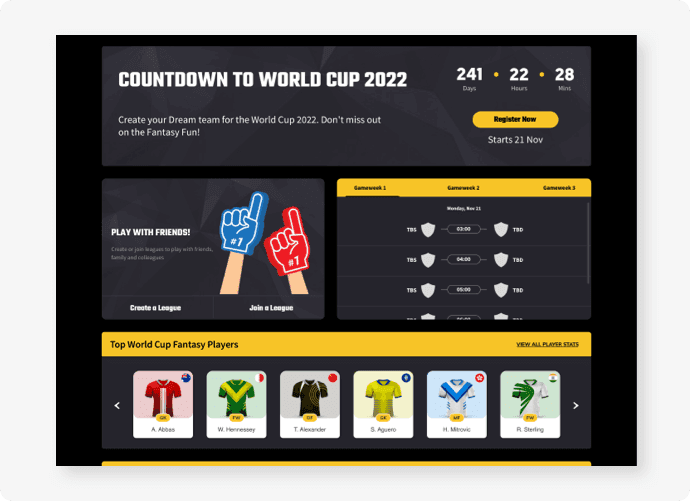
The homepage is beautifully designed, robust, and features enriched to suit all your user needs. Home is a page where users can view the overall stats like earned scores, top-performing players, team overview, and more.
- Pick a team
The action begins from here! Users can pick a team from here and create their first line up.
- Scores
A score bar to represent the current score of the user with the average and the highest scores of the week.
- Top scoring player
The top 10 scoring players are listed in uniquely designed widgets with player name, player position, team logo, and points scored in that week. On clicking the player widget, we get a detailed player card with the player’s overall statistics.
The space dedicated to the introduction of the latest features, product advancements, and product details.
- My Team overview
The overview of the user's team’s performance is represented with current scores, overall points, overall rank, no. of free transfers, remaining amount & team value.
Create Team
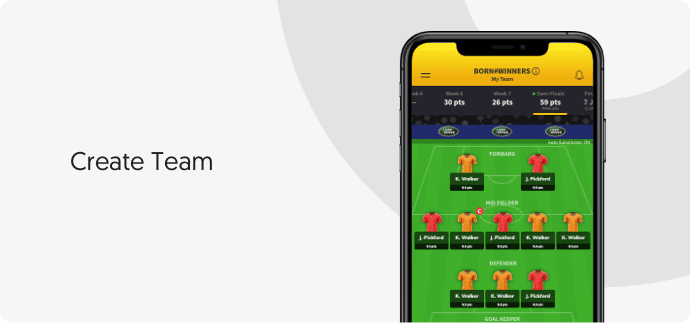
Here users can create their team using their skills, run their research, and pick the best players to create a super-efficient team.
- Squad size
To participate in the contest, users have to join the game by selecting a fantasy football squad of 15 players, consisting of:
2 Goalkeepers
5 Defenders
5 Midfielders
3 Forwards
Users must select 11 players who can play on the field and 4 players on the bench. All points for the game week will be scored by those 11 players.
Bench player consists of 1GK and 3 other position players, which are set to priority position from the GK as 1st priority, 2nd priority, 3rd priority.
Users get a pitch view and list view which provides the listing of the players selected and their salary and total points along with player details.
- Swapping
Users can swap players from the bench to playing 11 and can swap between bench players, to set the bench player priority for swapping.
- Budget
Upon sign up, users will be given the default budget to create their team. The price of players varies from 4.0 - 13.0 million Dollars depending upon their performances. Initially, they start with a price that depends upon how the player has played last tournament, and then the price may change accordingly depending on his current performance.
- Auto-pick draft
When using the "Auto pick Draft" option, the system automatically drafts players to each team in the league on a scheduled draft date, so team owners don't have to be online during the draft. Owners can pre-rank players in their draft lists to enhance their chances of getting their dream roster.
- Bench player
In team sports, substitution (or interchange) is replacing one player with another during a match. Substitute players not in the starting lineup (also known as bench players, backups, alternates, or reserves) reside on the bench and substitute for a starter
- Field view
Engaging field view with player position and salaries. Users can analyse and compare their teams with opponents.
Boosters
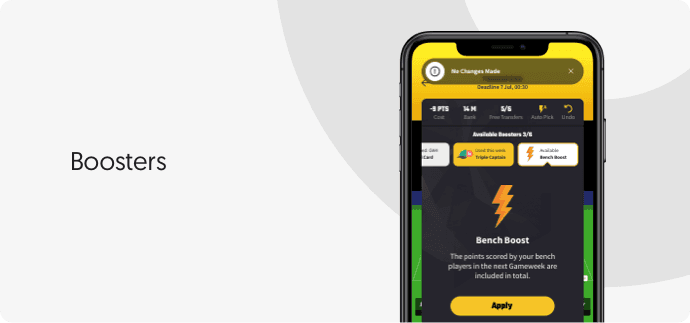
In our world cup fantasy software solution, 4 types of boosters (Bench Boost, Free Hit, Triple captain, and Wildcard) are available for users to enhance performance and score higher points.
- Bench boost
The points scored by the user's bench players in the next gameweek are included in the total. The Bench Boost chips can each be used only once a tournament and can be cancelled at any time before the Game week deadline.
- Free Hit
Free Hit lets users make unlimited transfers that are applied to one game a week only. At the next deadline, the original squad is returned. The Free Hit can be used once a tournament and cannot be cancelled once played.
- Triple Captain
The captain points selected by the user are tripled instead of doubled in the next game week. Triple Captain can each be used only once a tournament and can be cancelled at any time before the Game week deadline.
- Wildcard
The transfers (including those already made) made by the user in the game week are free of charge. The Wildcard chip can be used twice a tournament, once in the first half of the Tournament and once in the second half of the tournament. The Wildcard chip is played when confirming transfers that cost points and cannot be cancelled once played.
The Bench Boost and Triple Captain chips can each be used only once a tournament and can be cancelled at any time before the Game week deadline.
The Free Hit Chip can be used once a tournament and cannot be cancelled once played.
The Wildcard chip can be used twice a tournament, once in the first half of the tournament and once in the second half of the tournament. The Wildcard chip is played when confirming transfers that cost points and cannot be cancelled once played.
Transfers
- Transfer Process
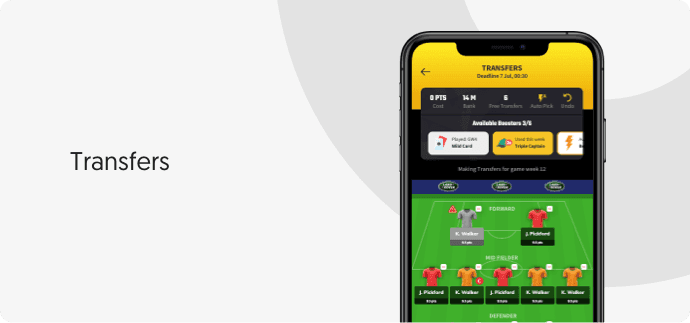
After selecting the squad users can buy and sell players in the transfer market. Unlimited transfers can be made at no cost until the first deadline. After the first deadline participant will receive 2 free transfers each week. Additional transfer in the same gameweek will deduct 4 points from your total score.
- Wild Card
It provides all transfers in the gameweek free of charge. The wildcard is a kind of booster that can be used twice per tournament. This cannot be cancelled once played.
Fixtures
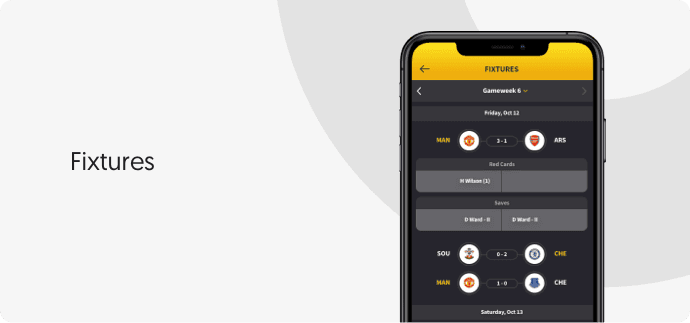
Fixtures are a list view, consisting of the upcoming and past weeks of the tournament and information about yellow cards, saves, goals, and assists.
Special Notifications
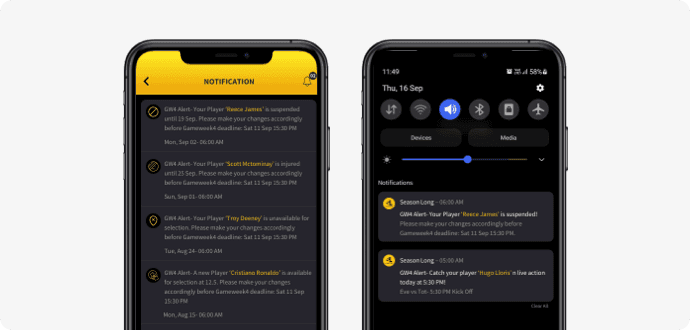
Unmissable Notifications added to World Cup Fantasy! Amazing live Notifications through Email, Push and In-App mediums which takes care of injuries, suspensions, unavailability and many more. Now you can forget to add reminders. We do that for you.
- In-App
In-App notification aims to enhance user experience by alerting users with important contest updates in real-time.
- Push
Push Notifications that which are sent to your smart phones with the most important tournament updates. Just a click away from reaching your My Teams screen from here!
- Email
Notifications will also be delivered in the form of an email to the user’s registered email address.
Leagues
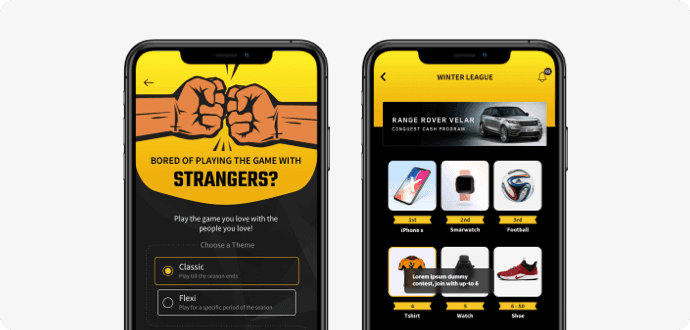
After creating a squad, we can join and create leagues to compete with friends, family and colleagues. The various league types are-
- Global league
Global league is a basic fantasy league featuring all the registered participants.
- Private league
Private leagues are the heart and soul of the game, where you compete against your friends. Just create a league and send out the unique code to allow your friends to join.
- Mini league
Mini Leagues are created for a specific number of game weeks. Users can simply join Mini Leagues and win exciting prizes by playing the game for a shorter duration. Play the game you love not just for banter or points, but for prizes also from now on!
Player Comparison
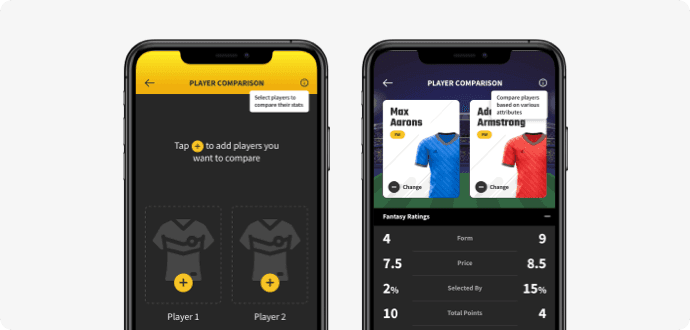
Compare players before you make decisions every week. Detailed in-depth stats that help you choose the best performing players while you make your transfers. Save a lot of time, all the numbers in one screen!
User Statistics
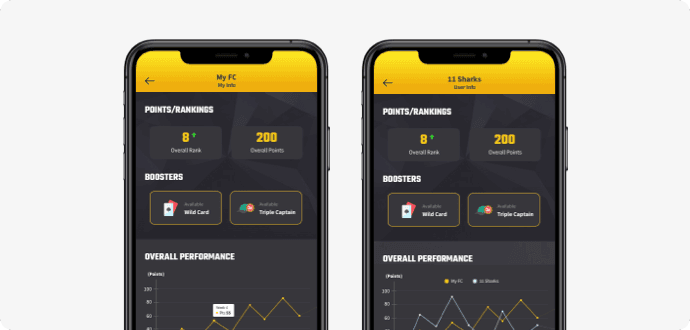
Users can now see a detailed report of their own performance and others who are playing with them. Now it is easy to track the overall performance and also compare your performance against any rival at the click of a button! Rank, points and the boosters available can be viewed without any hassle.
Scoring
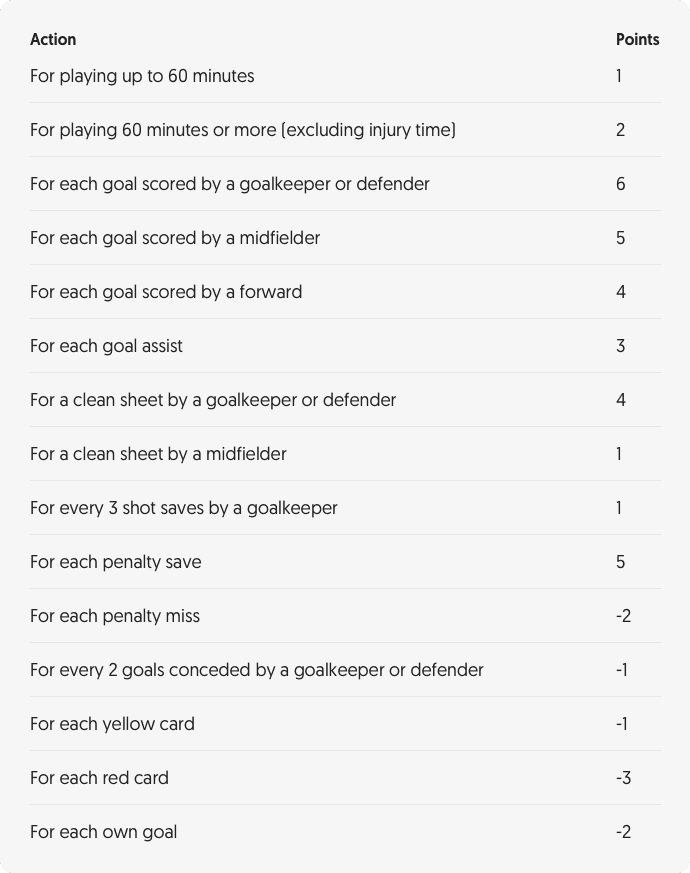
World Cup Fantasy Software provide a variety of scoring parameters that can be managed from the admin panel. You can set your own scoring rules for the overall game play. During the tournament, the fantasy football players chosen by the users in their respective teams will be allocated points based on their performance in the league.
The scoring system is entirely customizable, and you can make the changes from the admin section. It can be automated, or we can also provide a manual entry system.
- Penalties
In the case of a penalty, an assist is calculated for the player earning the penalty if a goal is scored. But not if the player played it himself, in that case, the assist is not counted.
- Clean sheets
A clean sheet is awarded for not conceding a goal whilst on the pitch and playing at least 60 minutes (excluding stoppage time).
- Red cards
If a player receives a red card, they will continue to be penalized for goals conceded by their team. Red card deductions include any points deducted for yellow cards.
- Own goals
If a player shoots or passes the ball and forces an opposing player to put the ball in his own net, then an assist is awarded.
- Assists
Assists are awarded to the player from the goal-scoring team, who makes the final pass before a goal is scored. An assist is awarded whether the pass was intentional (that it creates the chance) or unintentional (that the player had to dribble the ball or an inadvertent touch or shot created the chance).
If an opposing player touches the ball after the final pass before a goal is scored, significantly altering the intended destination of the ball, then no assist is awarded. Should a touch by an opposing player be followed by a defensive error by another opposing outfield player then no assist will be awarded. If the goal scorer loses and then regains possession, then no assist is awarded.
Static Pages
We all know the importance of static pages namely About Us, Contact Us, how it works, Rules and Scoring, Terms of Use, and Privacy policy. Transparency about your company’s core values and history, reliable contact information, rules and regulations about the game, terms of user engagement can help you develop user trust and loyalty.
Administration Portal
Our admin panel empowers you to manage everything - marketing, finance, daily operations, sponsorships, and reporting.
- Player Management
You can manage player-related functionalities like player position, player salaries, activation, and deactivation of players in the player management module of the admin panel.
- Team Management
The team management module enables you to edit/upload team jerseys and logos.
- Manage Users
If you want to search users, configure permissions, manage user details, rankings, deposits, document approvals, reports, and pretty much anything else, you can do it from the Manage Users panel. Admin can add users from the user management to encourage user participation. This will save the user from the tedious sign-up process and ensure smooth engagement.
- Fixture stats (tournament schedule)
Fixture stats are automatically updated by the feed providers and are displayed under the fixture tab of the website.
- Manage Advertisement
You can add and manage ad banners of your platform for promotions and sponsors as per your preference (all ads and sponsors related financial dealings to be held Off-Line).
- Guest line up creation
Your users can experience the game and the thrill of creating a team without registering on the platform. They can view players, stats to start creating the teams.
- Google Analytics with event tracking
With support to SEO capabilities and analytics platforms like Google Firebase, Google analytics, and Singular analytics, you will be able to organically grow your presence and uncover valuable data.